A whiteboard simulator for learning distributed systems and practicing for system design interviews: drag load balancers, caches, queues
and databases onto the canvas, wire them up,
push the load until something gives, and then work out how to fix it.
7-day free trial, card required · then US$14.99/month plus applicable tax · cancel anytime
Best on a laptop or desktop
Prepare for the system design round at
Google
Meta
Amazon
Apple
Netflix
Microsoft
Nvidia
Stripe
Uber
Airbnb
LinkedIn
Shopify
Databricks
DoorDash
Coinbase
Pinterest
OpenAI
Snowflake
Google
Meta
Amazon
Apple
Netflix
Microsoft
Nvidia
Stripe
Uber
Airbnb
LinkedIn
Shopify
Databricks
DoorDash
Coinbase
Pinterest
OpenAI
Snowflake
A screen recording of the simulator: components are dragged onto a hand-drawn canvas and wired from users through a load balancer to app
servers and a database. Pressing Play fills the arrows with pipes of traffic, wider where more requests flow. Raising the request rate saturates the database:
it turns orange, and errors and p95 latency climb in the stats bar. Adding a cache between the app servers and the database brings the
success rate back to 100% and latency back to normal.
“Immense help for senior+ level interview preparation.”
Drag users, load balancers, app servers, caches, databases, queues and more onto the whiteboard, and wire them together.
2
Send traffic
Press Play and watch traffic flow along the arrows as pipes: the wider, the busier, banded by reads, writes and retries, with errors flowing back in red.
3
Watch it break
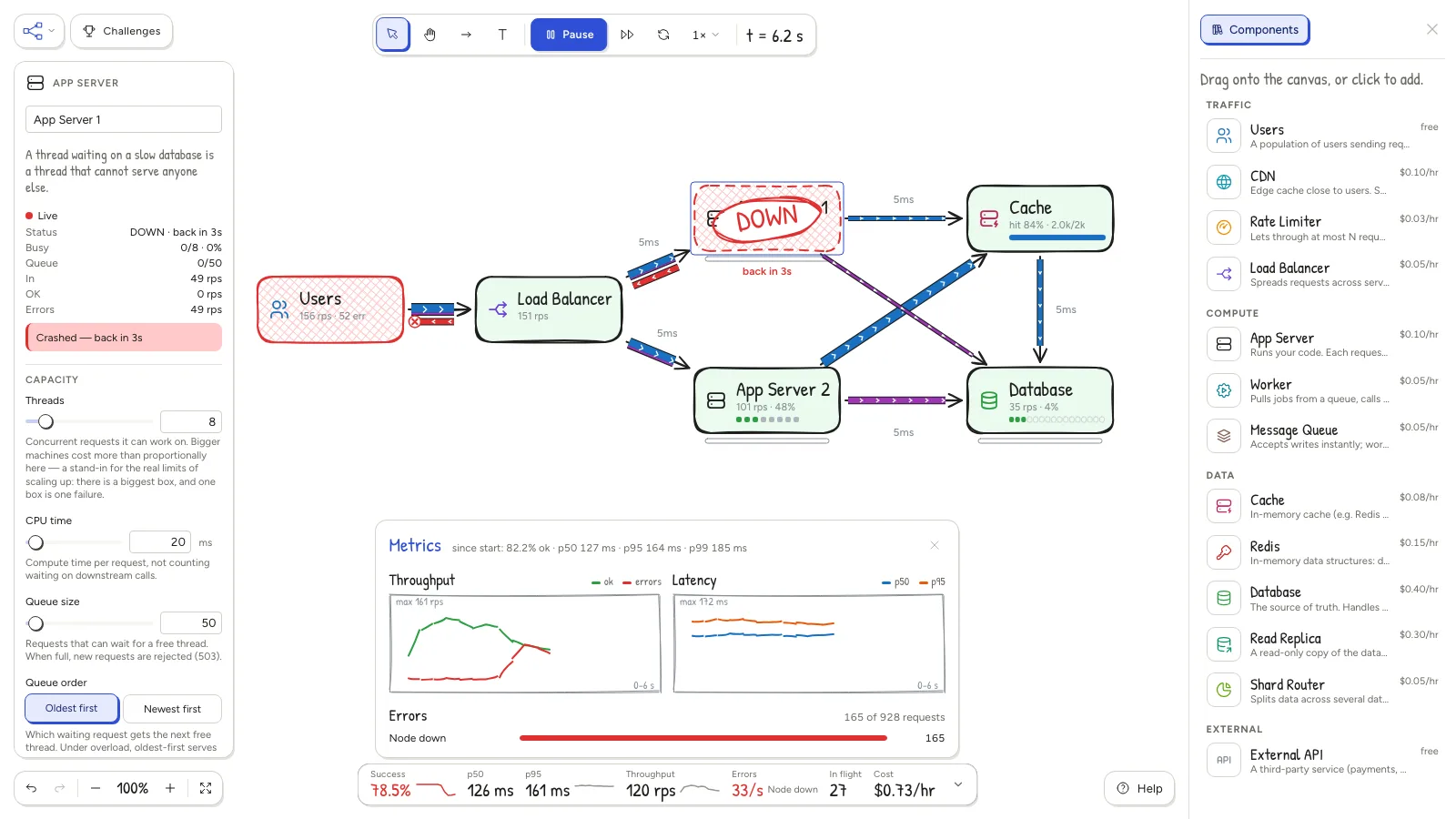
Servers saturate and turn red, queues fill, errors pile up and p95 latency climbs, while the meter shows what it all costs per hour.
4
Fix it
Scale out, add a cache, put a queue in front, shard the database or tune timeouts and retries. Then run it again.
What you'll learn
Every component runs a small, honest model of the real thing, so the trade-offs show up on their own.
Load balancing & health checks
Round robin vs least connections, and the requests lost before a crashed server is noticed.
Caching
LRU, LFU, FIFO and TTLs over realistic item popularity; invalidate or write through on writes; CDNs at the edge.
Read replicas
Extra read capacity, paid for with replication lag and stale reads.
Sharding
Spread writes across databases by key, and see what one hot key does to a shard.
Queues & workers
Absorb write spikes, watch the backlog grow and drain, and keep processing delay in check.
Rate limiting
A token bucket that turns overload into cheap, fast 429s instead of a pile-up.
Retries, timeouts & circuit breakers
How retries help you ride out a crash, and how they turn into a retry storm.
Redis data structures
Locks with leases, geo search and sorted sets, all on one single-threaded Redis.
Idempotency
A request that timed out can still land, and its retry charges the customer twice.
Connection pools
More app servers means more connections, until the database starts refusing them.
Overload control
Queue order and max queue wait, so servers stop working for users who already left.
Outlier ejection
A server that is up but ten times slower passes every health check. Route around it anyway.
28 challenges in three tracks
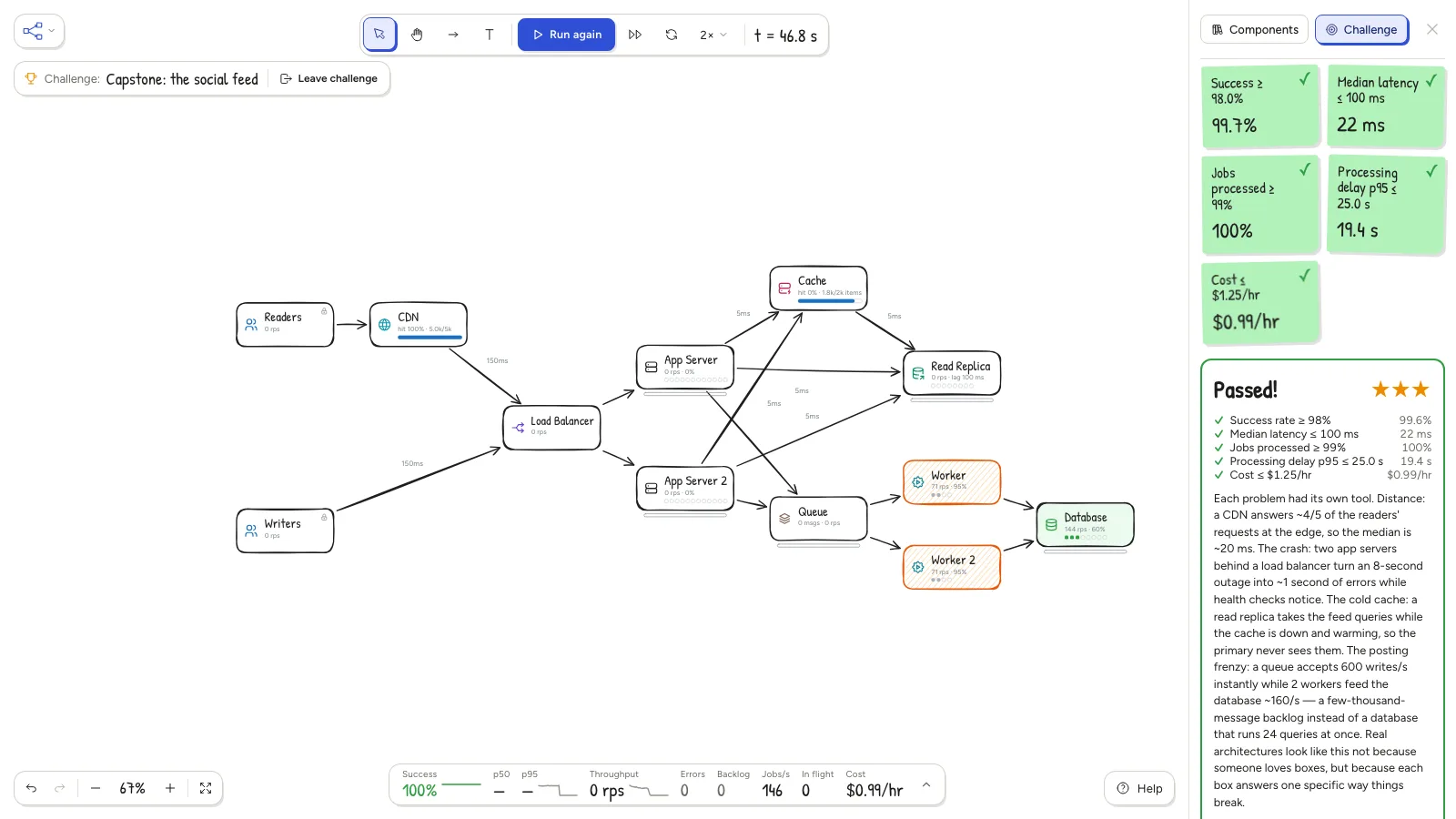
Each challenge starts with a diagram that fails at least one of its goals (success rate, latency, cost…). Fix it, press Play and earn up to three stars.
Core curriculum 12
One idea at a time, from your first server to a full stack.
Predict before you play: each challenge asks a question or two, like "which node fails first?", and tells you after the run whether you
were right. Incident mode freezes the architecture, so you fix the problem with configuration alone.
A closer look
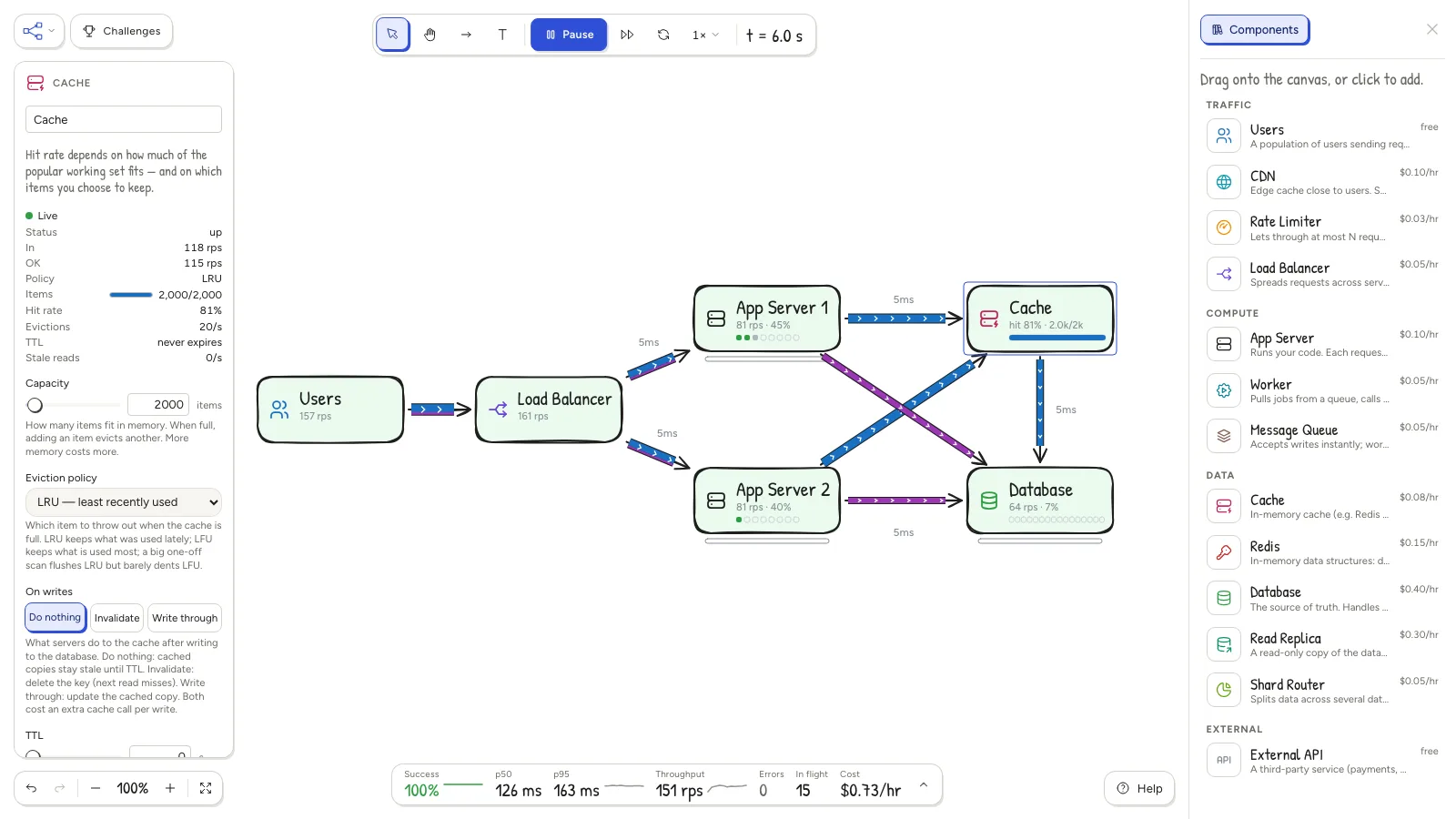
Build: every component has real settings, from thread counts to eviction policy.Break: crash a server and watch the load balancer and the error rate react.Challenge: meet every goal on budget and collect your stars.
Pricing
US$14.99 / month
plus applicable tax
Full access to the simulator, the tutorial and all 28 challenges.
Your exact total, in your local currency where available, is shown at checkout.
Try it free for 7 days.
You need a card to start the trial. You won't be charged during the trial.
If you don't cancel, we charge US$14.99 plus applicable tax when your trial ends, then every month on the same date until you cancel.
Cancel anytime online in a couple of clicks: Menu → Manage subscription in the simulator, or the Cancel subscription link at the
bottom of every page. Cancel before the trial ends and you pay nothing.
One free trial per person. Checkout is on Stripe's secure page, and your subscription is sold through Link, Stripe's merchant of record service.
Terms · Refund policy · Privacy
FAQ
How much does it cost?
US$14.99/month plus applicable tax, after a 7-day free trial. You need a card to start the trial. Cancel before it ends and you pay nothing.
Do I need an account?
Yes. You sign in with your email and no password: we email you a sign-in link.
How do I cancel?
In the simulator, Menu → Manage subscription, or "Cancel subscription" at the bottom of any page. It takes a
couple of clicks, with no emails or calls. You keep access until the end of the trial or the month you've paid for. You can also manage or
cancel it at link.com, where Link keeps your receipts.
Can I get a refund?
Cancel before your trial ends and you pay nothing. After that, payments aren't refundable except where the law requires it (for example the
EU/UK right to withdraw, which Link handles as the seller). Cancelling stops future charges. See the refund policy.
What will I see on my card statement?
A charge from Link, Stripe's merchant of record service, shown as "". Your receipts and invoices come from
Link too.
How is my work saved?
Automatically, as you work. Use Menu → Download as .json to keep a copy or move your diagrams to another computer. You can
download your diagrams even after a subscription ends.
Does it work on a phone?
This page does. The simulator is a drag-and-wire whiteboard built for a laptop or desktop (tablets work too); on a phone the toolbar and
library don't fit, and it will tell you so before you continue.
How realistic is it?
It's a simplified discrete-event simulation. Threads, queues, connection pools, caches holding real items, replication lag, retries and
timeouts are modeled, and network latency is a fixed delay per arrow; bandwidth, packet loss, disks and plenty of real-world detail are not. Treat the numbers as illustrative and the behavior as the
lesson. Help in the simulator explains what each component models.
Privacy
To run your subscription we keep your email address, your subscription status and a sign-in cookie. Full details are in the
Privacy Policy.